
• Sumaddle
  • FAQ
    • Fundamentals
    • Playing a puzzle
    • Settings
    • Levels of difficulty
    • Help and scoring
    • Pencil mode
    • Puzzle packs
    • Puzzle generator
    • Leaderboards
    • Performance analysis
    • Puzzle mechanics
    • App insights
  • Developer blog
  • Help and support
    • Troubleshooting
    • Contact
    • Report a crash
  • Privacy policy
  Sumaddle
Sumaddle

Developer blog

Usability improvements

1/5/2026

0 Comments

 
Version 2.6.0 features some usability improvements and styling adaptions. The changes in detail:
  • Each clue of a puzzle is now shown as having the shape of a button. This makes it more apparent that the clue values are also buttons. The shapes also help to indicate that a button is available, even when a clue value is hidden (in this case, the button can be used to fill gaps in the associated row or column).
  • The new button shapes for clue values can be turned off in the settings, if preferred. The setting can be found in the section “Layout & Appearance” under the heading “Puzzle clues”.
  • When the setting to “allow combinations to be deleted individually” is turned on, the clue value that is currently selected is shown highlighted with an underscore. This makes it possible to see, which clue the combinations relate to. This is of particular significance when there are multiple clues with the same value.
  • A usability issue concerning the panel with number combinations has been addressed. This panel sometimes overlaps the button for pausing a button, especially if playing on a small screen. Previously, this meant it was quite easy to tap the pause button by accident when trying to delete individual number combinations. An invisible buffer zone around the panel now stops this from happening (the panel is simply hidden instead).
  • The red filter is supported more comprehensively. It now works for all forms of popup interaction too.
  • Popup dialogs for confirming an action work better with large text sizes. This applies to the reset and help buttons when a puzzle is in play and to the buttons for selecting the level of difficulty for a new puzzle in the context of the puzzle generator.
  • When the puzzle generator is running in Keep It Simple or Normal play modes and an 8x8 or 9x9 puzzle is generated on demand with a target difficulty of Very Difficult, it is more likely that the target difficulty will actually be achieved.
  • The settings popup features some styling adaptions for iOS 26.
0 Comments

Turning up the logic again

14/4/2026

0 Comments

 
In version 2.5.0, more logic has been built into the puzzle generator and improvements made to the red filter. The changes in detail:
  • When running in Expert play mode, the puzzle generator is able to generate puzzles that are even more convoluted than before.
  • The red filter can now be added in all lighting modes. The filter also applies throughout the app, instead of just when playing a puzzle. This includes overlay presentations, such as when viewing a leaderboard, and (most) popup interactions. The red filter can be turned on in the settings under “Layout & Appearance”.
  • A fix for an issue with the help function, which was occasionally failing to provide any help.
0 Comments

The puzzle generator has more cunning

22/3/2026

0 Comments

 
In version 2.4.0, ​the puzzle generator has more cunning and deleted combinations are restored when steps are undone. The changes in detail:
  • More logic has been built into the puzzle generator, making it possible for it to generate puzzles that are even more challenging to solve! The new logic is used in Advanced and Expert play modes.
  • When the Undo button is used to back-track the steps that have been played, any combinations that were deleted individually are now restored on a step-by-step basis. The same also applies when the help option “undo back to where I went wrong” is used. The ability to delete individual combinations is an optional feature that can be turned on in the settings.
  • Some of the help explanations have been improved.
0 Comments

Festivities over

27/2/2026

0 Comments

 
The 5-year anniversary celebration is coming to an end, so the app is reverting back to its regular look. We hope the special edition gave players some fun!

App version 2.3.0 is now available in the App Store. The extra puzzles that were added for the special edition are still included in this version too and players who already started playing the puzzles will be able to finish playing them, until the leaderboard resets again. The reset will happen on 9th March (UTC).

Other small changes in this version:

  • The performance analysis popup features some styling adaptions for iOS 26. Some layout issues with this popup have also been fixed.
  • When a clue value is tapped and empty squares are auto-filled with blocks, a warning symbol is shown if setting a block would cause an invalid arrangement. This will be the case if there are already two blocks in the intersecting row or column.
  • A fix to prevent a crash from happening when resources cannot be loaded properly at app launch.
0 Comments

Celebrating 5 years of Sumaddle!

25/1/2026

0 Comments

 
Anniversary app icon
Version 2.2.0 is a special anniversary edition, to celebrate 5 years since Sumaddle first went live in the App Store! Don't miss the extra set of free puzzles, to be found in the section Puzzle Packs.

For more information about the special edition, please see the FAQ page Anniversary Special.

Other changes included in this version:
  • More styling adaptions for iOS 26 have been applied to the section for Puzzle Packs and to the popup view of leaderboard scores.
  • When the puzzles in a puzzle pack are reset, the clue values for the puzzles are re-arranged. The same applies to the puzzles featured in the preview of the puzzle generator. This helps to make the puzzles seem less familiar when played again.
  • The puzzle pool used by the preview of the puzzle generator contains a more diverse collection of puzzles.
  • Corrections to the way the preview of the puzzle generator picks the next puzzle from its pool when a puzzle of a particular size is requested. Sometimes, it was delivering a puzzle of the wrong size, or not delivering a puzzle at all, even though a suitable puzzle would have been available.
  • A fix for when a row or column has two blocks and there is just a single square outside the blocks. If the setting to show inverted combinations is enabled and the clue value is tapped twice, the combination is now shown inverted, as it should be.
  • The option to view the Game Center leaderboards using the classic display style has been dropped. It was no longer working with iOS 26.
0 Comments

New multi-select capabilities

18/11/2025

0 Comments

 
Version 2.1.0 includes new multi-select capabilities, together with some small corrections and fixes. The changes in detail:
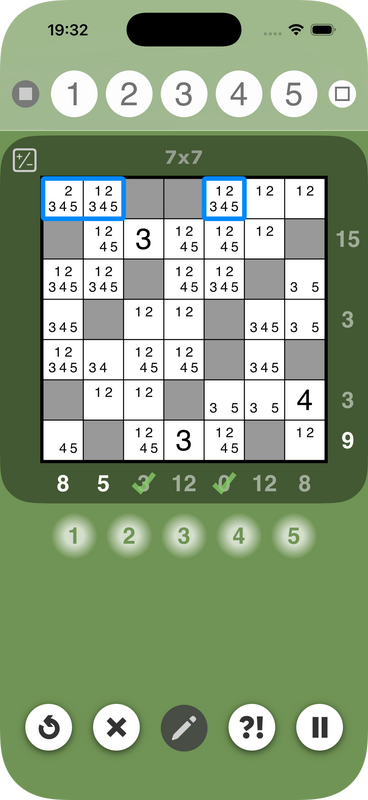
  • When multiple squares are selected by swiping (sliding) along a row or column, all squares that are not blocks are now selected together. Previously, multiple squares could only be selected together if they were all either inside or outside the blocks.
  • New settings for multi-select make it possible to adjust the current selection. Squares can be added to the selection, or removed from the selection, or the whole selection can be inverted. The new settings can be found on the settings page for optional features.
  • Pre-filled blocks in 9x9 puzzles are a little darker in all display modes.
  • Fix for an issue where the timer for a puzzle would not always start correctly.
  • Fixes for propagation issues when the candidate values of squares are changed.
  • The sliders used for setting the volume level and red-filter effect now snap to the step positions correctly.
  • Further attempts to prevent the Game Center access point from appearing on pages where it shouldn’t. This was sometimes happening when returning to the app after it had been inactive for an extended period.
The new multi-select capabilities may be particularly useful for when a row or column has n squares with exactly n candidate values. The screenshot below shows an example of such a case:
Picture
In this example, the first row has two squares which can only take the values 1 and 2. This means, the values 1 and 2 can be removed as candidates from all the other squares in the same row. Using the new multi-select feature, these squares can be selected together (as shown). It is then possible to eliminate the values 1 and 2 from all these squares at once, by double-tapping the number buttons. 
0 Comments

Ready for iOS 26!

10/9/2025

1 Comment

 
Version 2.0.0 includes styling adaptions for iOS/iPadOS 26 and some accessibility improvements, along with other small corrections and enhancements. The changes in detail:
  • Styling adaptions for iOS/iPadOS 26 have been applied throughout the app. In particular, buttons and backgrounds have a more rounded appearance and glass effect is used in some places. Buttons that are used in the headers of pages are now represented by symbols, instead of descriptive labels. Some content animations also work differently, such as when the explanation for help is revealed.
  • More improvements to accessibility, including better support for very large text sizes.
  • More refinements to the way the difficulty of a puzzle is estimated for new puzzles that are generated by the built-in puzzle generator.
  • When the option to select the size of the next puzzle is enabled for the puzzle generator, a new settings option makes it possible to select the puzzle difficulty too. This replaces the option that previously existed, which allowed the skill level to be selected. If the target difficulty is outside the range that is normally supported by the current play mode, the puzzle generator switches to a suitable alternative mode automatically.
  • On the settings page for layout & appearance, new screen layout options are available for iPhone. When the device orientation changes, players can choose to have the screen orientation switch back to the preferred orientation automatically. This may be a more convenient option than setting the orientation lock on the device. Players who like to play while lying down might find this feature particularly practical.
  • The settings page now includes an option to cancel all changes, in addition to the option to apply the changes.
  • When the setting “show if numbers add up correctly to the clue values” is enabled, an error is indicated if the number of squares between the blocks does not fit any valid combination for the clue value (in other words, if the wrong number of squares are sandwiched between the blocks).
  • In the performance analysis, the use of help that is described in the summary section at the top of the page is now based on the percentage of puzzles for which help was used. Previously, it described the extent to which the help was used when averaged over all puzzles. This could mean it described the use of help as being frequent, even when it was only used for one puzzle.
  • A fix to the progress reporting that is shown in the Challenge Trail. This was not informing of a promotion when a level was completed.
  • A fix for an issue with the Puzzle Generator Preview, where a change to the play mode was not actually taking effect.
The styling changes are seen when running with iOS/iPadOS 26. When running with older versions of iOS or iPadOS, the styling is still the same as before.
1 Comment

New puzzles in the Challenge Trail

19/5/2025

0 Comments

 
The free puzzles in the Challenge Trail have been updated in version 1.64.0:
  • Most of the puzzles in the harder levels have been replaced with new puzzles that reflect the difficulty ratings more accurately.
  • In the easier levels, some 4x4 puzzles are now featured.
  • In total, there are more puzzles to play than before.

Other changes in this version:

  • When the puzzle generator is configured with different weights for the different categories of puzzle difficulty, the puzzles are now generated with a better mix of difficulties.
  • When a square has no candidate values left, a yellow warning symbol is shown, instead of a plain empty square. When this happens, it usually means there is a mistake somewhere. A quick way to fix mistakes is to use the built-in help.

The new symbol that is shown when there are no candidate values left can be seen in the screenshot below:
Picture
0 Comments

Better accessibility

6/4/2025

0 Comments

 
Version 1.63.0 includes major improvements to accessibility and some other functional enhancements. The changes in detail:
  • Accessibility has been overhauled throughout the app. In particular, there is now comprehensive support for VoiceOver and the legibility of text has been improved in some places.
  • App Store interaction has been re-engineered to use Apple’s latest interface. One benefit is that a purchase on one device will automatically show up on other devices that are signed in using the same Apple account. This also applies if the app is transferred to a new device. If any purchases are not showing when Sumaddle is launched, please tap “Restore purchases” from inside the app to restore them. For more troubleshooting steps, please refer to the Troubleshooting page.
  • When the help is used to show how the next step goes, tapping outside the puzzle area no longer clears the help explanation. This makes it easier to examine the explanation multiple times. The explanation does still get cleared when a puzzle square is selected or when pencil mode is activated.
0 Comments

Puzzle packs can be reset individually

4/2/2025

0 Comments

 
Version 1.62.0 provides some improvements in the area of puzzle packs and some changes to the way the number buttons work. The changes in detail:
  • Puzzle packs can now be reset individually, instead of all packs in the same category having to be reset together. The menu option “reset puzzle packs” brings up a dialog in which the packs to be reset can be selected freely.
  • When playing the puzzles in puzzle packs, the way that the next puzzle is selected has been changed. It now works more sequentially, always proceeding forwards where possible. When all puzzles in a pack have been solved, the search proceeds forwards to the next available puzzle pack, instead of jumping back to the first pack.
  • When a puzzle in a puzzle pack is paused, the page with the button for continuing play now includes a new button to “skip to next puzzle”. This provides a more convenient way to proceed to the next puzzle in a pack, rather than having to go back to the overview of puzzles and selecting the next puzzle manually.
  • The way the number buttons switch between being active or inactive has been changed. The buttons are now only active for the numbers that are still considered to be candidates, they are inactive for numbers that have already been eliminated. This helps to prevent numbers from being mistakenly re-added to a square, or to a group of squares. It also makes it easier to see which combinations fit a group of squares that have been selected together.
  • Depending on playing strategy, some players may prefer to have the number buttons working as they did before. The setting “tie number buttons to narrowed candidates” makes it possible to choose, whether the buttons work in the new or old way. This new setting can be found in the settings section for “optional features”, it is on by default (= new way of working).
  • When a single square is selected and the candidate values are updated by tapping the number buttons, values that are eliminated are now highlighted with orange/pink. This is consistent with the way the numbers are highlighted when multiple squares are selected and operated on together.
  • When a single square is selected and pencil mode is active, the number buttons no longer appear with orange highlighting for all buttons. Instead, the buttons use the same highlighting as when pencil mode is not active.
  • Added dark and tinted app icons for iOS 18 / iPadOS 18.
  • Added some measures that might help to prevent the Game Center icon from being shown at the wrong time when the app is brought back into action after having been suspended for a while.
  • Some corrections have been made to the way that candidate values are restored to related squares when the selected square (or group of squares) is cleared by tapping repeatedly, or by tapping the clear button.
0 Comments
<<Previous
Powered by hostfactory
  • Sumaddle
  • FAQ
    • Fundamentals
    • Playing a puzzle
    • Settings
    • Levels of difficulty
    • Help and scoring
    • Pencil mode
    • Puzzle packs
    • Puzzle generator
    • Leaderboards
    • Performance analysis
    • Puzzle mechanics
    • App insights
  • Developer blog
  • Help and support
    • Troubleshooting
    • Contact
    • Report a crash
  • Privacy policy