• Sumaddle
  • FAQ
    • Fundamentals
    • Playing a puzzle
    • Settings
    • Levels of difficulty
    • Help and scoring
    • Pencil mode
    • Puzzle packs
    • Puzzle generator
    • Leaderboards
    • Performance analysis
    • Puzzle mechanics
    • App insights
  • Developer blog
  • Help and support
    • Troubleshooting
    • Contact
    • Report a crash
  • Privacy policy
  Sumaddle
Sumaddle

Developer blog

New multi-select capabilities

18/11/2025

0 Comments

 
Version 2.1.0 includes new multi-select capabilities, together with some small corrections and fixes. The changes in detail:
  • When multiple squares are selected by swiping (sliding) along a row or column, all squares that are not blocks are now selected together. Previously, multiple squares could only be selected together if they were all either inside or outside the blocks.
  • New settings for multi-select make it possible to adjust the current selection. Squares can be added to the selection, or removed from the selection, or the whole selection can be inverted. The new settings can be found on the settings page for optional features.
  • Pre-filled blocks in 9x9 puzzles are a little darker in all display modes.
  • Fix for an issue where the timer for a puzzle would not always start correctly.
  • Fixes for propagation issues when the candidate values of squares are changed.
  • The sliders used for setting the volume level and red-filter effect now snap to the step positions correctly.
  • Further attempts to prevent the Game Center access point from appearing on pages where it shouldn’t. This was sometimes happening when returning to the app after it had been inactive for an extended period.
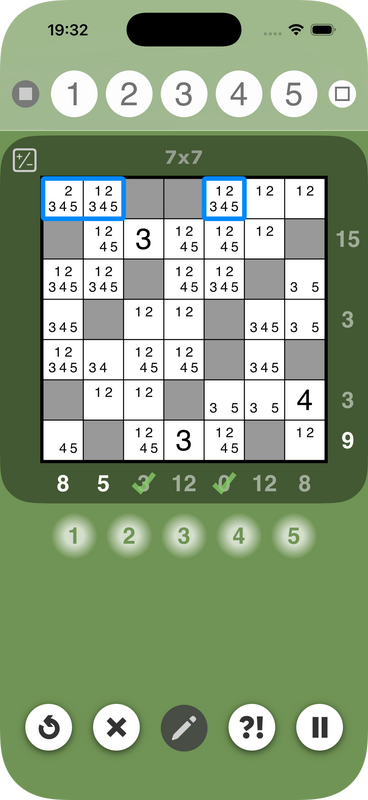
The new multi-select capabilities may be particularly useful for when a row or column has n squares with exactly n candidate values. The screenshot below shows an example of such a case:
Picture
In this example, the first row has two squares which can only take the values 1 and 2. This means, the values 1 and 2 can be removed as candidates from all the other squares in the same row. Using the new multi-select feature, these squares can be selected together (as shown). It is then possible to eliminate the values 1 and 2 from all these squares at once, by double-tapping the number buttons. 
0 Comments


Leave a Reply.

Powered by hostfactory
  • Sumaddle
  • FAQ
    • Fundamentals
    • Playing a puzzle
    • Settings
    • Levels of difficulty
    • Help and scoring
    • Pencil mode
    • Puzzle packs
    • Puzzle generator
    • Leaderboards
    • Performance analysis
    • Puzzle mechanics
    • App insights
  • Developer blog
  • Help and support
    • Troubleshooting
    • Contact
    • Report a crash
  • Privacy policy