• Sumaddle
  • FAQ
    • Fundamentals
    • Playing a puzzle
    • Settings
    • Levels of difficulty
    • Help and scoring
    • Pencil mode
    • Puzzle packs
    • Puzzle generator
    • Leaderboards
    • Performance analysis
    • Puzzle mechanics
    • App insights
  • Developer blog
  • Help and support
    • Troubleshooting
    • Contact
    • Report a crash
  • Privacy policy
  Sumaddle
Sumaddle

Developer blog

9x9 puzzles

21/2/2023

0 Comments

 
The puzzle generator built into the app can now generate 9x9 puzzles! This is the main change in version 1.45.0. All the changes in detail:
  • The Advanced and Expert modes of Random Play now support generation of 9x9 puzzles. 9x9 puzzles can also be launched from any play mode when the option to select the size of the next puzzle is enabled in the Random Play settings. The free preview of Random Play has been supplemented with some examples of 9x9 puzzles.
  • When puzzles are generated with hidden sum values, the difficulty weighting selected in the settings is now observed more closely.
  • Empty squares have a slightly darker appearance than squares with numbers. This gives a clearer distinction between squares where it is known that a number will appear and squares where a block might still be possible. It also helps to make pencil mode easier to use.
  • A new app setting makes it possible to disable Game Center completely. The app settings can be found in the section Sumaddle of the device settings.
  • The screens for the in-app settings have been de-cluttered by moving additional information into info items which are collapsed by default.
  • More improvements to help explanations.
0 Comments

Sounds and haptics

6/2/2023

0 Comments

 
Sounds and haptics have been added to the app in version 1.44.0, which has gone live today. Have fun discovering the different sound effects for when a puzzle is solved!

Other changes included in this version:
  • It is now possible to reach the general play settings via the options menu found on the start page of the Challenge Trail and the Puzzle Sets overview.
  • For new players, the setting to “show if sums add up correctly” is now on by default. The FAQ section on playing a puzzle explains what this setting shows. Screenshots used in the introduction have been updated accordingly.
  • When a number combination is applied to a group of squares that have been selected together (multi-select), it is less likely that an error for an incorrect sum will be signalled after some but not all of the numbers have been tapped in.
  • A link to the quick survey has been added to the info panel.
0 Comments

New generator logic and multi-select improvements

15/1/2023

1 Comment

 
Version 1.43.0 is a return to the regular look following the Holiday Special edition. The extra set of puzzles is still included and can be played until the end of January. Also in this version:
  • New logic has been built into the puzzle generator. This may be used when puzzles are generated at Expert skill level in Random Play. Puzzles that involve the new logic can be harder than ever!
  • Some improvements to the way that operations are performed on a group of squares that have been selected together. This applies when the squares between two blocks are selected, either by tapping the sum value or by swiping, or when this selection is inverted by tapping the sum value again. More details below.
  • More improvements to the help explanations.

The improvements to multi-select operations are as follows:
  • If there is only one square left which doesn’t yet have a value, tapping a number button will set the number on that one square. Previously, the number was set as a candidate on the square, which meant the number did not get confirmed until the square was tapped separately.
  • If candidate values are eliminated by tapping the numbers twice, the numbers that remain are automatically applied as the chosen combination once the right number of values are left. In other words, the values in the chosen combination are eliminated from the other squares in the same row or column, just as if these numbers had been tapped in individually.
  • If the setting to “show if sums add up correctly” has been turned on, it is less likely that an intersecting row or column will show an incorrect sum momentarily while combination values are being applied to the selection.
1 Comment

Holiday Special

21/12/2022

0 Comments

 
Version 1.42.0 has gone live in the App Store today. This is a special holiday edition, featuring some graphical adaptions and an additional set of free puzzles. A separate FAQ page for the Holiday Special has more details. Have fun playing the special puzzles!

Other changes included in this version:
  • full support for Split View on iPad
  • tweaks to the scoring: difficult and very-difficult 8x8 puzzles score more points than previously
  • the feedback shown when help is used is more sympathetic!
0 Comments

First Random Play million!

4/12/2022

0 Comments

 
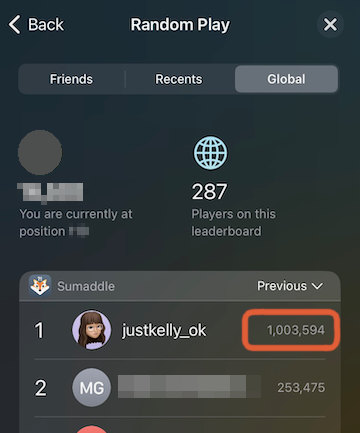
Congratulations justkelly_ok, who is the first player to crack the mark of 1,000,000 points on the Random Play leaderboard in one 24-hour period. Amazing!
Picture
0 Comments

Narrowing down the number combinations

23/11/2022

0 Comments

 
A new setting has been added in version 1.41.0 to help players with narrowing down the number combinations. When the squares between two blocks are selected, players can now choose to see just the combinations with the right number of values, instead of all possible combiantions.

​The new setting can be found in the General settings under the heading NUMBER COMBINATIONS.
0 Comments

Inverted combinations

2/11/2022

0 Comments

 
To complement the new functionality for inverting a selection that was introduced in the previous release, version 1.40.0 provides a new setting that makes it possible to show the sum combinations in inverted form too. This setting can be found in the General settings under the heading NUMBER COMBINATIONS.

​Also in version 1.40.0:
  • After playing a puzzle in the section Puzzle Sets, the overview of puzzles now brings the puzzle just played into view automatically. Previously, it was sometimes necessary to scroll down to find the puzzle just played.
  • An attempted fix for occasional crashes that have been reported as happening on iPhones running iOS 16.
0 Comments

Inverting a selection

14/10/2022

0 Comments

 
Players will already be familiar with the technique of tapping a sum value to select the squares between two blocks. A second tap now inverts the selection and selects the squares outside the blocks. This makes it possible to apply updates to all the squares outside the blocks simultaneously, in the same way as it works for the squares between the blocks when these are selected together.

Inverting a selection can help to speed up play, for example:
  • It makes it a little easier to set the remainder value when just one square gets left over, such as, setting 1 on the last square when the sum is 14 in a 7x7 puzzle.
  • It also makes it easier to eliminate values from the squares outside the blocks, such as, removing 1 from the squares outside the blocks in a 7x7 puzzle when a sum of 8 uses 3 squares.

Inverting a selection is the main change in version 1.39.0. Also in this version:
  • In Random Play, the mode used to generate a puzzle is shown on the outcome page.
  • Back buttons have been made more responsive.
A small problem with inverted selections was identified in version 1.39.0. The inverted selection was not working correctly when applied to a row with a single square between the blocks. This issue has been fixed in version 1.39.1.
0 Comments

More small improvements

1/10/2022

0 Comments

 
Sumaddle version 1.38.0 contains some small corrections and enhancements. The changes in detail:
  • The page showing the outcome of a puzzle now includes summary information to describe the puzzle just played (this is shown at the top).
  • In the performance analysis, the analysis at group level now shows the average points for the puzzles in a group, instead of the total points.
  • Long help explanations can now be scrolled. This ensures that the explanations are able to fit within the display space available.
  • In Random Play, when the setting for selecting the size of the next puzzle has been turned on, a new option lets players choose to see the outcome page of the previous puzzle when Random Play is first launched. This makes it possible to select the size of the first new puzzle to be generated.
  • Also included: some cosmetic improvements, a fix to the way the candidate values for empty puzzle squares are determined and more corrections to the help explanations.
0 Comments

A way to play faster and fixes for iOS 16

17/9/2022

0 Comments

 
Version 1.37.0 includes a way to play faster, fixes for iOS 16 and some other small enhancements. The changes in detail:
  • When a sum value for a row or column is tapped, empty squares are automatically converted to blocks if the number of empty squares exactly matches the number of blocks still needed. This can help to speed up play!
  • When a puzzle is in play, the size of the puzzle is now shown for reference. This new feature can be turned off in the settings, if not required.
  • When dark mode is in operation and “dark” has been selected as the dark-mode appearance, the sum values are shown in yellow, instead of dimmed white. This makes the sum values easier to distinguish from numbers set on squares in the puzzle grid.
  • Fixes for some layout and transition issues when running on iOS 16.
  • More improvements to the help explanations.
The new technique for speeding up play is described in more detail in the FAQ section on playing a puzzle - please see the question "is there an easy way to fill the gaps in a row or column when the positions of the blocks are known?".
0 Comments
<<Previous
Forward>>
Powered by hostfactory
  • Sumaddle
  • FAQ
    • Fundamentals
    • Playing a puzzle
    • Settings
    • Levels of difficulty
    • Help and scoring
    • Pencil mode
    • Puzzle packs
    • Puzzle generator
    • Leaderboards
    • Performance analysis
    • Puzzle mechanics
    • App insights
  • Developer blog
  • Help and support
    • Troubleshooting
    • Contact
    • Report a crash
  • Privacy policy